Slang Expressions in Korean (Talk To Me In Korean) Review

안녕하세요!

I can say without a doubt that Talk To Me In Korean is my favorite Korean study resource. It has constant updates to add to its existing lessons and it uses really fun and informative videos, audio, PDFs, physical textbooks, pictures, and more (ie social media like Twitter and Facebook) to teach Korean. Since I love TTMIK, I was excited to try their Slang Expressions in Korean lessons (they’re available online at My Korean Store). This great product allows the purchaser to choose which price to pay based on their funds or what they personally think the product is worth and is inexpensively priced at $2.99, $4.99 or $9.99.

The Slang Expressions lessons are well worth any price. The package comes as an online download; after purchasing, I waited a few minutes for a confirmation email and then an email with a link to a temporary download. The lesson package can be downloaded a couple times (if you have multiple computers, you can download it to each one rather than spending time transferring with a USB), and the download link expires after about a week (so if you decide to get this, don’t sit around for a month not checking your email and wondering where on earth your Korean slang lessons have gone).

The Slang Expressions download came as a zipped folder that unzipped to show four audio files (I copied them to iTunes and added them to my ‘TTMIK Extras’ playlist) and a PDF (if you have an iPhone, download the iBooks app for free, add the PDF to your iTunes books library by dragging it or copying it, then sync that PDF to your phone to study Korean on the go). The four audio files included three lessons – Chapters 1, 2, and 3 – and a great Mini Dialogue Audio Track to practice with at the end of the lessons.

iBooks PDFs

The audio

  • each lesson is 16-17 minutes
  • the mini dialogue is about 8 minutes
  • each lesson corresponds to a chapter in the PDF and includes 10 slang expressions
  • a slang expression is given, its meaning is explained, and different forms (ie noun, adjective, adverb, etc.) are also given
  • the origin of the slang expression is also explained
  • mini conversations between native Korean speakers (mainly in 반말 or informal language because this is slang Korean) help clarify usage at the end of the explanation: the first speaker talks, 선현우선생님 translates, the second speaker talks, 선현우선생님 translates, etc. until the conversations ends; then the conversation is repeated but without translation in between speakers
  • though the PDF is a great tool for reading Korean and reinforcing the slang expressions, the audio allows you to multitask by listening to the slang lessons while you’re busy folding laundry, working out, or getting from A to B

The PDF

  • the PDF is efficiently organized into three chapters that correspond to the audio
  • everything spoken in the audio is included in the PDF
  • Korean words and dialogues are written in hangul without romanization pronunciation guides, so it’s best to listen to the audio alongside reading the PDF (at least for the first time)
  • dialogues and examples of the word in other usages are on the left side; translations are on the right (the following picture is zoomed in on the examples and dialogue)

Slang Expressions screenshotOverall…

One big reason why I love TTMIK is that their lessons, while being extremely relevant, helpful, and informative, are never boring, and just about every sample dialogue is funny (I often find myself laughing while I’m studying). Each useful phrase is either a common real-life example or a conversation that sounds like it’s straight out of a funny and romantic Korean drama. These Slang Expressions in Korean lessons include some of my favorite funny dialogues.

Slang Expressions dialogue

Beyond being funny and memorable, the phrases are surprisingly relevant. I hesitated to buy this at first because the phrases that the product description mentioned seemed irrelevant to most regular conversations – yet the lessons’ examples showed me that these phrases are a great asset to my vocabulary; I can’t wait to begin using them naturally in conversations and understanding their use in music, shows, and real life.

I definitely recommend that you check out the sample audio and PDF and then purchase these lessons to add to your Korean study resources. If your Korean isn’t high enough to understand complex grammar and all the ins and outs of how a sentence is put together, don’t worry; these lessons are very simple and easy to follow, and you can always begin by memorizing terms. Save the sentence dissection for when you get to that level. Speaking a language is all about sounding natural, and these Slang Expressions can set you on the right path.

NOTE: The majority of the Slang Expressions lessons are in informal language or 반말, which means just because you’re feeling high and mighty and like a G-Dragon perty boy (Crayon? Anyone, anyone?) you can’t just casually use slang to an older person or someone you’re supposed to be polite to. If you’re not sure, don’t use it – in case it’ll offend the other person. You might seem more rude and stupid than fluent and intelligent.

감사합니다!
Changing your keyboard for Windows 8

안녕하세요!

If you have a computer with Windows 8 (I have Windows 7), it’s a bit more difficult to change your keyboard’s input. This article helps explain what changed between Windows 7 and Windows 8 and guides you to the screen where you can change your keyboard’s input language by adding Korean and other languages to its repertoire.

NOTE: A comment on the article says that pressing Win + X opens the “Power user shortcut menu (Device Manager, Control Panel, Command Prompt etc.) and then you can select Control Panel from it”. Another comment explains that rather than clicking on all the different options in Control Panel, put “language” into the Control Panel Search, then go from there.

The “from there” should entail clicking on Add an input method to access the list of other keyboard input languages. Remember to add both Korean and Korean IME.

감사합니다!

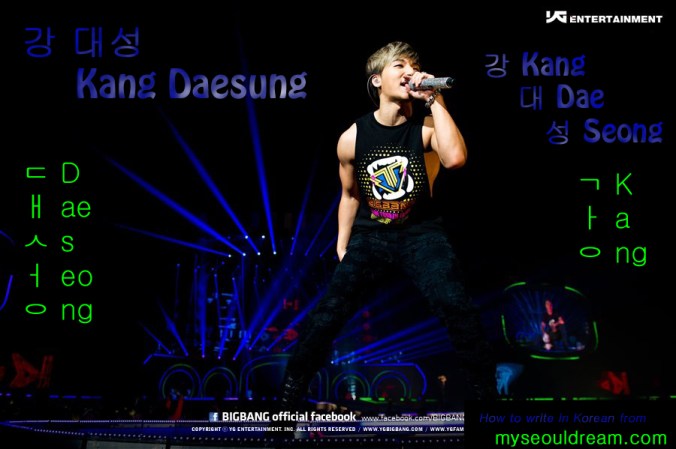
Write Daesung’s name in Korean (BIGBANG)

Write Daesung's name in Korean (BIGBANG)

강 대성
Kang Daesung
Photo from BIGBANG’s official Facebook page.
Edited in Photoshop 11.

Extra Help with Hangul

안녕하세요! Are you still struggling to read Korean? Maybe you mix up certain vowels all the time, or you just cannot seem to ever pronounce a specific letter correctly. While I still think that practicing writing out words, phrases, even lyrics to entire songs in Korean can really help you master Hangul, it’s always nice to have a quick and easy reference to check when you’re struggling. My best friend sent me this post from Pinterest; it explains how to read Hangul through a comic-style format by associating the different symbols with words and objects that use the same pronunciation. I definitely recommend this Pinterest post whether you’re just beginning to learn Korean or if you’re a seasoned champ who reads a chapter book written in Hangul a day.

Check it out here if you still haven’t clicked: http://pinterest.com/pin/227642956135413610/

감사합니다!

Learning a Language through Music

안녕하세요!

When you’re studying a language of another country, immersion in that language is a fantastic tool for stepping up the level of vocabulary and pronunciation. However, depending on where you live and how much money you have, immersion can be a difficult thing to pursue. How do you deal with this?

Create your own immersion. There are many ways to do this, and it’s best if you combine them all. Watch shows in your target language, listen to music by native speakers, and read books (whether they’re short picture books or full-length novels, or not even books at all, you can find them at your local library or order them from a site like HanBooks).

Music touches the soul. Listening to Korean music can really invigorate you and give you the motivation to study a bit harder, a bit longer. Because you really want to be able to sing along and understand the lyrics without looking them up. And music in your target language is a great background to whatever you’re doing. Go work out, work on homework, or cultivate a garden, or just relax into a chair and listen to something calming. All these things can be done while listening to Korean music.

If you don’t like K-pop, it’s not the end. There are lots of other Korean music genres to listen to. Do some research and find a music style that appeals to you. Then you can make a YouTube playlist of the songs, buy them on iTunes, order a physical copy from an online store, or, if you’re feeling like exploring, try the rad.io app.

rad.io allows you to listen to basically any Internet radio under the sun. Stations like seoul.fM, Big B Radio, and Kpop play a mix of the latest and greatest OSTs, K-pop, and have little or no advertising.

Ready to immerse yourself wherever you are? 그래. 화이팅!

감사합니다!

Typing in Korean: how to change a computer’s input language

4안녕하세요!


There, I just did it. I typed in Korean.


Typing in the target language is an invaluable ability for the language-learner. If you take a Spanish class, you have to turn in typed essays. For Spanish, it is not as big a problem if you don’t set your language into Spanish – all you have to deal with is an annoying squiggly line under every single word. But to type in a language that uses a completely different writing system, like Korean, Japanese, Russian, Chinese, etc., a computer has to be set to use multiple “keyboards”.


Before you get excited and go add Korean to your computer’s “keyboards”, take a moment to look at your actual keyboard’s keys. They’re probably the alphabet used by English, Spanish, etc. Not Korean, not Japanese, not Russian. They’re also probably in QWERTY format. The Korean keyboard is NOT in QWERTY format because it does not have Q – it doesn’t have any of those letters, technically. It has hangul, and your QWERTY is actually ㅂㅈㄷㄱㅅㅛ. Not the same. Unless you intend to learn through very aggravating trial-and-error, I recommend that you order keyboard stickers. They’re cheap and well worth the money. I use black background stickers with white-symbol QWERTY format, yellow-symbol Japanese hiragana (ひらがな), and blue-symbol Korean (한글) hangul. You can purchase clear, white, or black backed stickers, with either just English and Korean, just English and Japanese, or all three. If you also intend to learn Japanese, it really doesn’t matter if you get Japanese symbols as part of the set too, because that format is rarely used (more about that in a late post). The stickers are best applied with a pair of tweezers, they don’t take long to put on your keys, and they stick very well. I have never had any of them come off or even get a little bit loose.


Black background stickers with English, Japanese, and Korean: http://www.amazon.com/dp/B003PHOW7C/ref=pe_175190_21431760_M2T1_SC_3p_dp_1


Black background with English and Korean: http://www.amazon.com/KOREAN-ENGLISH-NON-TRANSPARENT-KEYBOARD-BACKGROUND-NOTEBOOK/dp/B0038J84NU/ref=pd_sbs_op_3


The total with shipping for one set is about $6. If you’re serious about learning Korean, this isn’t a bad price for learning to type.


But what’s the point of stickers if you can’t properly use them? While you’re awaiting your stickers, add Korean to your computer. I use a laptop running Windows 7: if you have something different, please just Google how to change your keyboard settings or reference this for Windows 8 ^_^


1. Open your Control Panel.

2. Under Clock, Language, and Region, click on Change keyboards or other input methods.

3. Select the tab labeled Keyboards and Languages and click Change keyboards.

4. Under the General tab, to the right of the box with a diagram that says Keyboard, click the Add… button.

5. Scroll down to Korean, click its + sign, click the + sign for Keyboard, and then check the boxes for Korean and Microsoft IME. Make sure you click BOTH of those boxes and BOTH of them have checks. Now click OK.

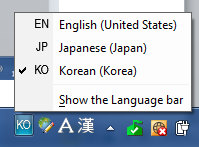
6. Your box of keyboard languages should now include KO. Click Apply, and then click OK.

NOTE: The rest of this is up to your personal preference, but this is how I have further customized.

7. Select the tab Language Bar and choose Docked in the taskbar. I have Show the language bar as transparent when inactive and Show text labels on the Language bar also checked.

3

You should now have a language button on your taskbar. EN for English!

8. Want to switch between keyboards quicker? As I type in three keyboard formats, this is a nice customization. Select the tab Advanced Key Settings. Set a hot key pattern to use to switch to Korean and a pattern to switch to English.

NOTE: The default typing system will remain in English no matter what keyboard you switch to. However, if you look at your taskbar, pressing these hot keys will alter the keyboard so you can toggle between Korean and English when using the Korean keyboard. This sounds confusing but once you start using it, it will make a lot more sense.

1

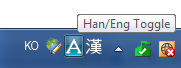
Notice that though the keyboard is set to KO (Korean keyboard format), it will still type in English when you switch to it. See the A. A means that it types in English.

5

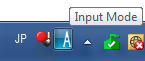
This occurs for any non-English keyboard. Though this is switched into Japanese, it will still type in English…

6

….until the Input Mode ‘A’ is toggled to hiragana, katakana, etc.

2

However, when you toggle the A by clicking on it, it switches immediately into hangul! See the 가? The Korean keyboard is will now type hangul!


If you have questions or need a step clarified, please comment. 감사합니다!


An extra muffin: Often, when you visit sites in other languages, your computer isn’t set to recognize characters from that language’s “keyboard” and it will show question marks or random symbols. It can’t process that HTML. When you add that language to your computer, however, it stops this from happening (most of the time).

The Little Things Count

안녕하세요! There’s one little way that I keep my Korean learning active, even when I’m too busy or lazy to do actual Talk To Me In Korean lessons, or practice writing in my wonderful big notebook, or when I’m so incredibly tired that I can’t even stay awake to exercise my Korean “ear” by watching Family Outing and trying to pick out words…

Well, I said one little way, but it actually ends up paying off big time. I have gradually put my language settings into Korean. My iPod is in Korean. My iPhone is in Korean. My Gmail account, my Twitter, my Facebook, and even my Skype are in Korean. It sounds scary – what if you try to change settings and delete something, or friend a weirdo, or Tweet gibberish and lose followers? Or, horror of horrors, you can’t figure out how to make your iPod stop repeating a song over and over?

It’s really not bad at all. If you’ve learned the basics of hangul, it actually is a huge help for reading. You’re constantly checking your phone, listening to music, or scrolling through an inbox that seems unending. A fair amount of the hangul that you’re reading is also not even strictly in “Korean.” For example, my iPod says 비디오 for video. “Bi-di-o”. On my phone, I tap the green icon labeled 메시지 (me-si-ji) to check my text messages. But because the other words are all actual Korean words, you begin to subconsciously pick up that 설정 is Setting and 음악 is Music.

I recommend that you don’t throw all your electronics and emails and whatnot into a big wad of semi-understandable Korean, though. Take your time. Put your iPod in Korean, where the worst thing you can do is choose Playlist instead of Artist because you forgot the Korean word. Once you’re comfortable with that, but not too comfortable, put your email in Korean. Your Facebook. Skype. Your phone. Suddenly, you’ll realize you’re surrounded constantly by little Korean lessons.

To be safe, if you commonly have settings that you change on your phone and you don’t want to be caught translating your entire Settings in a huge rush just to tweak something, make a note somewhere with carefully laid out steps of how to change those settings. I wanted to make sure I could check my data usage easily, so I made a note or 메모 on my phone that gave me the steps to checking it. I don’t need the note anymore, and I know all the Korean words involved in the process.

An extra muffin for you: When your email, phone, or iPod are in Korean, chances are that the annoying person who always snatches your phone to play with it or tries to prank you by hacking your email will have a much harder time. I can’t remember all the times someone has grabbed my phone and then, a moment later, handed it back in disappointment because they had no idea how to use it. But for you? Not in English? Noooot a problem. ^_^ 감사합니다!

Albert Einstein Quote

In the middle of difficulty lies opportunity.
곤경의 한 가운데에 기회가 놓여 있기 마련이다.

– 알베르트 아인슈타인, Albert Einstein

Courtesy of Hwangssabu’s Twitter. Follow him at https://twitter.com/Hwangssabu

Hwangssabu is the trainer for Big Bang. If you’ve ever at least read one of his tweets, you’ll know how incredibly energetic and excited he is for people to be healthy and fit. HWANGSSABU RULES!

A Quote A Day in English & Korean

안녕하세요!  Wonder why I use that so often? I want to get really, really fast at typing it ^_^ Anyways, I just wanted to mention something Twitter-related. I follow an account that posts a quote every single day – and the quote is given in both English and Korean. You can follow here. It’s really wonderful to read an interesting quote, often one that I’ve never heard before, and then read the proper translation into Korean, too!

Today’s quote:

Always read stuff that will make you look good if you die in the middle of it.

읽다가 죽더라도 멋져 보일만한 책을 항상 읽으라.

P. J. O’Rourke

I made the following image from a quote that was tweeted a couple days ago. The William Shakespeare quote “To thine own self be true” has always been my personal motto. I created this to help me learn the Korean translation.

Created in Photoshop 11

To Thine Own Self Be True (please credit if you remove for your own purposes)

Can’t read it? Go check out my post on how to read Korean.

the write way to learn hangul

hangul-basic

(Don’t want to read my wordiness? Just use these links: Hangul Basics & Read, Write, and Pronounce Korean.)

WRITE IT. (And yes, my title is written incorrectly as a bad pun. Deal with it.) That’s the right way to learn Hangul, and eventually Korean. Unless you’re solely intent on learning to speak and comprehend spoken Korean, the proper first step for language-learning is studying the Korean script known in South Korea as Hangul or Hangeul (I prefer romanizing it as Hangeul although it is most commonly written as Hangul in English).

한글 Hangeul:

Han = “great”

Geul =”script”

Hangeul is a beautifully designed alphabet from the Joseon Dynasty (1443) that relies on grouping 24 vowel and consonant symbols into syllabic blocks. It’s read from left to right like English.

First, give yourself some background. The history of this script is interesting, and skimming the Wikipedia page is actually pretty valuable to provide a rudimentary understanding.

Secondly, use this fantastic free site for learning the individual symbols, their sounds, and how they fit together. It’s divided into six lessons, but currently only the first five are available. However, those five are sufficient to get you reading and writing Hangeul! The sixth lesson would teach you about double letters, but those are easy to recognize (they are simply smaller versions of the single letters!), ie ㄲ is the double letter for ㄱ.

EDIT: Also check out this post for some extra help.

It took me a couple days, spending twenty or so minutes each day, to learn Hangeul from this site. Don’t be lazy; dedicate one of your raggedy old unused notebooks to Hangeul and write out those words that the lessons give you. Include the romanization (the word written in English) as well as the pronunciation. Write the correct pronunciation the best way you will recognize it. You’ll feel intelligent, your notebook will suddenly seem much more valuable and interesting with all the Hangeul symbols covering its pages, and you’ll start impressing people with your Korean doodles.

If you don’t have much time or even if you do, do one or two lessons a day, as early in your day as you can. Throughout the day, take little pauses to write out a few of the symbols you learned. Read it aloud to yourself (quietly, so you don’t look as crazy), square your shoulders, and feel proud of what you’ve learned so far. Look at signs and visualize how they’d be written in Hangeul, and sound out all those fine phonetics. You might get it wrong at first, but practice, practice, practice – and then it’ll become second nature.

Don’t be intimidated; it’s one of the easiest alphabets to learn. 행운을 빌어요! ^_^