Anki Flashcards Review

안녕하세요!

Anki is a fantastic resource for the language-learner (and even for the regular student overwhelmed with facts to learn about cellular process, calculus definitions, and historical dates). Anki calls itself “friendly, intelligent flashcards” for a reason; the program is a free download that remembers what you’ve forgotten, what you’ve remembered, and everything in between, and creates a unique review system based on how quickly and how accurately you recall information.

b5Anki has rather dull appearance, but its selling point is its function: helping you learn what you struggle with the most. And it does that very, very well.

When you open the program on your computer after downloading, you will have an empty program. You can download pre-made flashcard decks for free by going to File, Download, and Shared Decks. Depending on the deck, you can even download audio extensions and files to help with pronunciation of the words and phrases you’re learning; however, I prefer using Anki purely for reading and comprehension rather than downloading extra audio files. Anki also offers the option of creating your own notecards; (warning: personal opinion again) I prefer using pre-made decks because the platform for deck creation is unwieldy and time-consuming to make a deck work properly. It’s not impossible; it’s just not for the impatient student. Also, the pros of making a deck on Anki outweigh the cons – it’s way better and more effective to study with Anki than regular physical notecards or other free flashcard programs.

Once you have downloaded a deck, it will appear in the program.

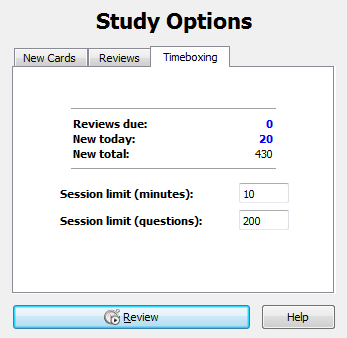
Open it and you find different settings for studying. b2

b3


The flashcards, as flashcards often do, capitalize on repetition. But this repetition is smart and effective repetition. As you go through the cards, the program brings back cards that you’ve forgotten more frequently than cards you’ve remembered. It also takes into account how long it takes you to click Show Answer.
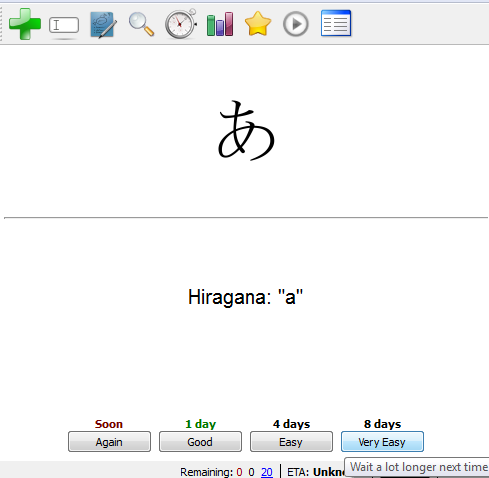
b4


The conclusion: Anki is a great flashcard program. It’s free. It’s smart. It uses your time effectively because it doesn’t waste time reviewing information that you already know, and focuses instead on what you struggle with. While I dislike making my own decks and how boring the interface itself looks, this is a great language-learning resource. There are tons of free, pre-made decks of Korean vocabulary, grammar, Hangul, practice sentences, hanja, etc. as well as lots of other stuff that might interest you. And if you don’t like it after downloading and trying it, then just delete it from your computer!

An extra muffinAnki is a free program, but it has to support itself somehow. Proceeds from its Anki app and donations from users help it stay free. If you really like Anki on your computer, consider paying the creators back and getting yourself the Anki app.

감사합니다!

Learn Korean iPhone App Review

learn korean app

안 녕하세요! Well, the world has changed. You used to have to carry around a heavy little pocket dictionary in foreign countries to help explain to a local how you have no idea where you are. These days, we have access to wonderful apps like Learn Korean on the iPhone that will even speak the words aloud FOR you. No worrying about mispronunciation.


The breakdown: Learn Korean is an application in the Apple App Store. It has numerous categories: Greetings, General Conversation, Numbers, Directions & Places, Transportation, Eating Out, Time and Date, Accommodation, Shopping, Colors, Cities and Provinces, Countries, Tourist Attractions, Family, Dating, Emergency, Feeling Sick, and Tongue Twisters. The number of phrases in each category ranges 20+ and some have more than 60. Tap once, and each phrase includes the written hangul, romanization, and English translation. Tap a phrase twice and listen to a native speaker’s audio recording. Hold a finger on a phrase and copy either the hangul or the translation. Press the heart to the side of a phrase and save it as a favorite for a quick list at the bottom.


Here are some screenshots of the app in action.

Use the search option to quickly look up phrases.

Learn Korean app search

Add phrases to your favorites list for easy access.


Learn Korean app favorite phrases


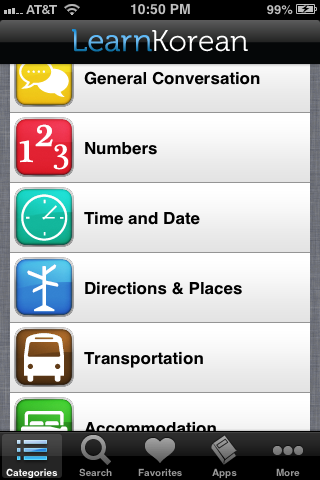
Swipe through the many categories to find exactly what you’re looking for wherever you are, whatever you’re doing.


Learn Korean app categories


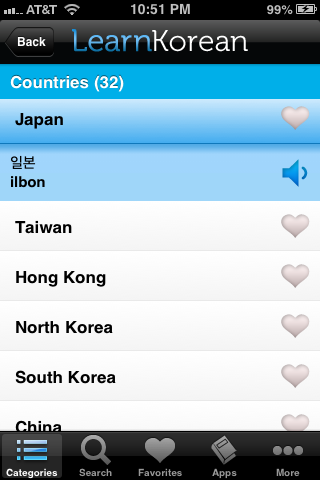
Tap once for the hangul and romanization, twice for the Korean pronunciation.


Learn Korean app tap


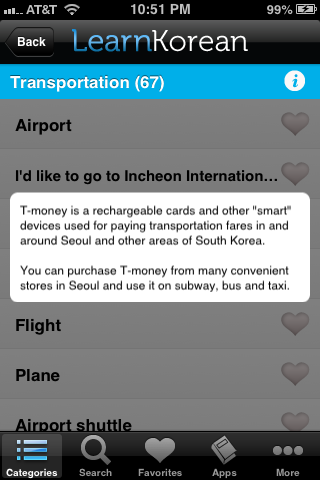
Some of the categories have little useful tips!


Learn Korean app tip


Toggle the play phrases automatically button to switch your preferences if your pronunciation is already excellent. Also, check out cogent’s other language apps. I have their full LearnJapanese app! And for first-time users, a quick glance through the Tips section is very helpful.


Learn Korean app tips


Here are some phrases from the Eating Out category.


Learn Korean app Eating Out


Overall, this is a really great app to use, whether casually or seriously. If you’re waiting in line, on a subway, AT Subway, or anywhere, you can just plug your headphones in and go over a few phrases. You can download the free version with access to Greetings, General Conversation, Numbers, Directions & Places, Transportation, and Eating Out, but to get the rest of the categories, as well as automatic updates with new phrases, you have to pay $4.99 for Learn Korean Pro. If you’re not going to rely heavily on this app, don’t bother, but if you really enjoy the free version, then just don’t buy four iTunes songs and spend your moolah on a couple hundred Korean phrases instead. And p.s., you’ll definitely enjoy access to the Tongue Twisters section.


감사합니다! 또 봐요!

Talk To Me In Korean Review

안녕하세요! This is a review of the language-learning website called Talk To Me In Korean. TTMIK uses a variety of materials, from audio to PDFs, videos to textbooks. Native Korean teachers constantly update the website with new lessons and are extremely interactive with their students, both online and in person. They’re very good teachers and they know what they’re talking about – and they’re never boring.

The break down:

  • 9 Levels, average 25+ lessons per level (exception for Level 9 which currently has only 1)
    • Explore Levels 1-7 curriculum here
    • Lesson length ranges from 1-30 minute(s)
    • Covers Hangeul, vocabulary, grammar, common phrases, verb conjugation, pronunciation, and more, for students anywhere from beginner to advanced
  • Free workbooks, quizzes, reviews
  • Everything is free or very cheap (with different pricing options)
  • iPhone Apps available for free – access all these materials on an easy-to-use App that allows you to listen while you look at the PDF on your smartphone screen
  • TTMIK teachers and materials accessible through smartphones, Twitter, YouTube, their own extensive website, Facebook, Google+
  • Created by native speakers living and working in South Korea
  • A whole lot of extra material available via TTMIK’s store and through their connected website, HaruKorean, where students pay about $6 a month for daily new lessons, 24-hour feedback, and more practice, practice, practice

Overall, Talk To Me In Korean is definitely my favorite language learning website. I would make a list of the pros, but those are already listed above because everything TTMIK does is a pro. The teachers are fun and interesting, making each lesson dynamic, and TTMIK just keeps coming up with more material in new and exciting ways! For example, if you like TTMIK on Facebook, you’ll find vocabulary pictures while scrolling through your newsfeed-they post pictures tagged in Korean to teach vocab. You’ll also hear about new materials that they create and events that they hold. You can subscribe to them on YouTube to enter contests, learn native pronunciation, and review vocab. The teachers Tweet, too. You can’t help but learn Korean from this amazing language resource!

However, I would still recommend signing up for a free Livemocha account even if you use everything that TTMIK offers and none of Livemocha’s lessons. Livemocha is an excellent supplement because it provides a platform for you to meet native Korean speakers who are learning English and chat with them in real-time. I talk more about Livemocha here, as well as explain how to utilize TTMIK.

You want to learn Korean? You can do it. Be brave. Don’t shy away. Start learning right now.

Language is the blood of the soul into which thoughts run and out of which they grow.
‒Oliver Wendell Holmes

Learning Korean: TTMIK and Livemocha are Fantastic (Baby!) Language Learning Resources

Created in Photoshop 11

(Don’t want to read my wordiness? Click here and here.)

So you’ve learned to read and write in Korean. You forget a letter now and then and you feel like a child struggling through simple sentences – but cheer up! Everybody has to read that way in the beginning. You’re about to get much better, and the way you’re going to do this is by learning Korean words, phrases, grammar, and culture.

Different people have different methods for how they learn. Some people need to see, some need to hear, some need even more interactive material. To learn Korean, you need all of the above. In this post, I’m going to introduce some of the best language resources that I’ve used to learn Korean.

1. You should head over to Talk To Me In Korean and explore. They have countless audio, PDF, and video lessons available for free, not to mention they recently (per the time of this post) came out with textbooks! I recommend that you subscribe to them on YouTube, Facebook, and Twitter. The more regular language-learning sources you have, the more you will remember even when you’re scrolling mindlessly through your news feed.

TTMIK currently has several levels of lessons, each level with about 20 or more audio lessons that range from five to twenty minutes in length. Download these lessons individually for free or in bulk for cheap and save them to your Automatically Add to iTunes folder. (Music>iTunes>iTunes Media>Automatically Add to iTunes) and then listen to them on your iPod or computer anytime. Start with Level 1 Lesson 1. Play the first audio lesson, pull out that Hangul notebook and open up the corresponding TTMIK PDF from their website. The teachers are very funny, helpful, and real – these are people who genuinely want to help you! You’ll enjoy their lessons and discover that learning Korean isn’t as hard as you thought.

In summary: TTMIK provides extensive language material (audio, PDF, textbook, video) for completely new students to linguaphiles aiming for fluency.

There’s so much to Talk To Me In Korean that I’ll discuss all their available resources in a later post. Please wait for it! ^_^

But if you use no other resource to learn Korean, then use TTMIK. They’re the best I’ve used, and while other sites provide excellent things here and there, TTMIK is the all-around winner so why bother with anything else.

2. Livemocha is a huge and growing language site for people across the globe. Sign up for a free account, choose your native language and the language(s) you want to learn, and start learning! The site first introduces phrases in Korean by associating them with pictures captioned in the target language (ie a woman waving while a voice rolls out of your speakers with a nice loud annyeonghaseyo! and 안녕하세요 appears beneath it) but it expects you to already know Hangul. Livemocha, unlike TTMIK, doesn’t provide a method of learning Hangul.

Following the phrase introduction, Livemocha users review through mini-quizzes that test their memory with written, spoken, and visual cues. An image of a woman waving appears, and the option of 안녕하세요 pops up as one of the answer options. A voice cheerily speaks hello in Korean, and the woman waves from one of the answer options. Once every question has been answered the next step is a test.

There are two tests for each lesson. The first is written. A simple prompt will be given (Introduce yourself / Write six sentences saying what something is (house, a dog, a man, a woman…) / Describe six objects.).. and then the user enters the writing submission. Likewise, each lesson provides the user with a small piece to read aloud (for Korean, it’s provided both in Hangul and in romanization). It’s necessary to have a microphone for this so that you can record your audio submissions. After completing either exercise, the user submits and awaits a review. The beauty of Livemocha is that native Korean speakers review your submissions. You’re getting real people here. Real Korean speakers who know what they’re talking about and they know it better even than the cut-and-dry Korean phrases that Livemocha just drilled into you.

In summary: Livemocha’s greatest claim to fame is that native speakers tell you what you’re doing wrong and what you’re doing right. You might even be lucky and meet a Korean speaker learning English. Exchange Skype names and start chatting! Don’t be shy. Or at least, be shy but be shy while typing in Korean. PS, you get to review the English submissions of other language speakers on Livemocha, too.

But hey. Listen up. All these resources are no good if you don’t practice. Doing a lesson each day or every few days isn’t enough. I like italicizing things. Write some Korean on the side of some notes from another class. Make a couple note cards* and flip through them between classes, while waiting in the check-out line, and not while driving. Murmur phrases at appropriate times without freaking out the poor passerby who has no idea that you are speaking Korean. Before you fall asleep, recall the new grammar and vocabulary you learned today. Because practice is that important.

Learn it, know it, use it, or lose it.